
















Audi A4 B8 Vodič za nadogradnju digitalnog instrument tabla za modele 2009–2012
Audi A4 B8 Vodič za nadogradnju digitalnog instrument tabla za modele 2009–2012
Ovaj vodič objašnjava kako radi nadogradnja digitalnog instrument tabla za Audi A4 B8 modele iz 2009–2012. godine s originalnim analognim mjeračima. Obuhvata provjere kompatibilnosti, ograničenja plug-and-play ožičenja, ponašanje upravljača i kontrole brisača, logiku instalacije, očekivanja od navigacijskog prikaza, tehničke specifikacije i šta treba potvrditi prije kupovine retrofit kompleta.
Nadogradnja digitalnog instrument tabla za Audi A4 B8 uglavnom je namijenjena modelima A4 B8 iz 2009.–2012. godine s originalnim analognim mjeračima. Prije kupovine provjerite godinu vašeg modela, fotografiju originalnog instrument tableta, stranu upravljača, putanju konektora, stanje kontrola na upravljaču, stanje ručice brisača i sve prethodne izmjene ožičenja ili kodiranja. Ovaj članak je vodič za kupovinu i instalaciju, a ne zamjena za stranicu proizvoda.
Real Audi A4 B8 Digital Cluster Upgrade Reference
Before reading the technical evaluation, compare the original analog cluster with the 12.3-inch digital cluster result. The visual upgrade is clear, but the correct version still depends on the original cluster, dashboard frame, steering side and connector route.
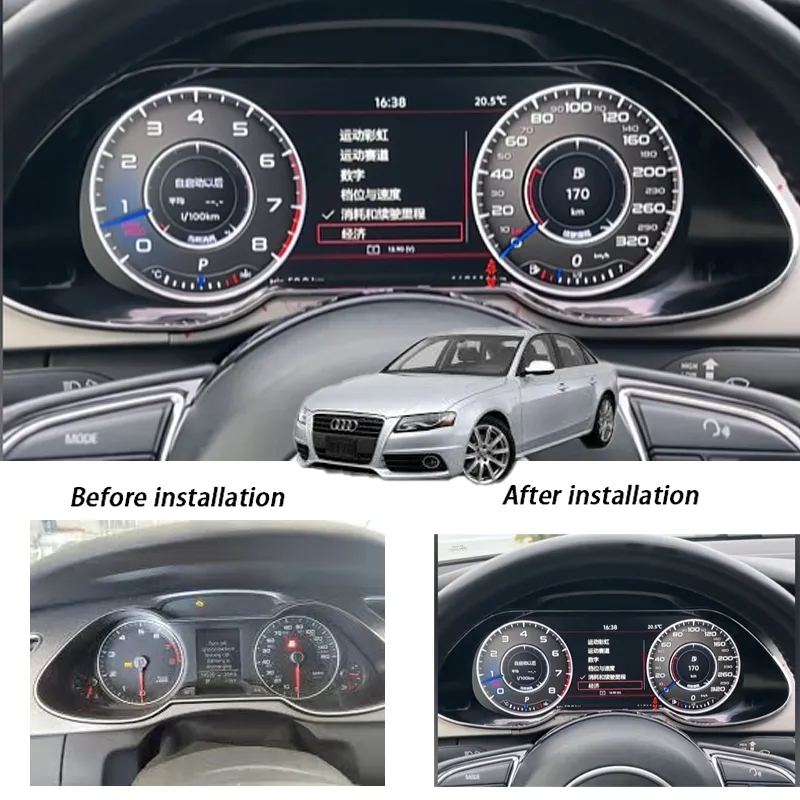
Audi A4 B8 Digital Cluster Buyer Decision Score
This evaluation explains the buying decision before ordering: upgrade value, original vehicle compatibility, and installation difficulty. Each score is shown with its full rating scale and scoring breakdown, so the buyer can understand what the current level actually means.
The Audi A4 B8 remains a useful long-term ownership platform, but the original analog gauge area makes the cabin feel older than the rest of the vehicle. A 12.3-inch digital cluster creates a clear driver-display upgrade.
Factory speed, RPM, fuel, mileage, warning prompts and basic driver data can be retained where the original cluster, dashboard frame, connector route and vehicle configuration match the supported route.
This is an instrument-cluster retrofit, not a cosmetic trim accessory. The original cluster must be removed carefully, the matched harness route must be checked, and vehicle data must be tested before final reassembly.
Šta ova nadogradnja digitalne instrument table za Audi A4 B8 radi
The Vodič za nadogradnju digitalne instrument table za Audi A4 B8 napisano je za vlasnike koji žele razumjeti retrofit prije naručivanja hardvera. Povezani proizvod je Audi A4 B8 digitalna instrument tabla za modele iz perioda 2009–2012, koristeći 12,3-inčni LCD panel za zamjenu originalnog analognog prikaza instrumenata modernim digitalnim rasporedom.
Svrha nije samo da kokpit izgleda novije. Pravilno Nadogradnja digitalne instrument table za Audi A4 B8 Mora prikazivati brzinu, broj obrtaja u minuti (RPM), podatke o gorivu, ikone upozorenja, informacije o putovanju, podržane navigacijske upute i status vozila na čitljiv način. Također mora raditi s originalnom rutom podataka vozila gdje je podržano.
Za trenutnu cijenu, opcije kupovine i detaljne specifikacije proizvoda, koristite stranicu proizvoda: Audi A4 B8 digitalna instrument tabla 2009–2012 .
Zašto Audi A4 B8 i dalje ima koristi od digitalne nadogradnje instrument table
Audi A4 B8 i dalje je popularna rabljena Audi platforma jer nudi čvrstu šasiju, poznati raspored unutrašnjosti i dobru dugoročnu vrijednost vlasništva. Slaba točka je vozački prikaz. Većina modela A4 B8 iz razdoblja 2009–2012. i dalje koristi mehaničke analogne brojčanike s malim središnjim informativnim prozorom.
Noviji modeli Audija koriste potpuno digitalnu instrumentnu ploču, općenito poznatu kao Virtualni kokpit. A4 B8 nije dobio taj sistem iz tvornice. Jedan Retrofit virtualnog kokpita za Audi A4 B8 Retrofit digitalnog instrument tabla je stoga aftermarket rješenje za vlasnike koji žele moderniji kokpit, a da ne zamijene cijelo vozilo.
U poređenju sa originalnim analognim mjeračima, jedan Audi A4 B8 digitalna instrument tabla može pružiti:
- Jasniji digitalni prikaz brzine i broja obrtaja u minuti.
- veći informativni prostor za podatke o vožnji i statusu podržanog vozila.
- moderniji izgled instrument table.
- bolja čitljivost noću.
- Više rasporeda prikaza, tamo gdje ih podržava verzija softvera.
- navigacija ili ogledavanje prikaza na podržanim postavkama.
Ovo nadogradnja ne pretvara A4 B8 u Audi nove generacije. Ona modernizira prikaz instrumenata, a istovremeno zadržava postojeću platformu vozila, originalnu elektroniku i podržanu tvorničku rutu podataka.
Područje primjene: Audi A4 B8 modeli 2009–2012
Ovo Nadogradnja instrument table za Audi A4 B8 Namijenjen je modelima Audi A4 B8 iz perioda od 2009. do 2012. godine sa originalnom analognom instrument tablom. Na većini tržišta, to uključuje:
- Audi A4 limuzina B8, 2009–2012.
- Audi A4 Avant B8, 2009–2012.
Vozila s upravljačem na desnoj strani, nestandardne tržišne verzije, automobili popravljeni nakon nesreće, vozila s prethodnim izmjenama u ožičenju i automobili s intenzivno modificiranom elektronikom zahtijevaju dodatnu potvrdu prije narudžbe.
| Provjerite stavku | Zašto je važno | Šta treba dostaviti |
|---|---|---|
| Godina modela | Članak i upute za proizvod usmjereni su na modele Audi A4 B8 iz 2009–2012. godine. | Godina vozila iz registracije ili sa VIN naljepnice. |
| Originalna fotografija instrument table | Okvir instrument table i otvor kontrolne table su ključne provjere pristajanja. | Jasna prednja fotografija originalnog instrument tableta sa uključenim napajanjem. |
| Konektor ruta | Razlike u konektorima ili prethodne popravke ožičenja mogu utjecati na instalaciju. | Fotografija konektora sa stražnje strane, ako je dostupna. |
| LHD / RHD | Raspoređivanje instrumenata i ugao gledanja mogu se razlikovati ovisno o strani upravljanja. | Potvrdite upravljanje s lijeve ili s desne strane. |
| Prethodne izmjene | Neoriginalni upravljači, neoriginalni kontrolni moduli ili promjene kodiranja mogu utjecati na ponašanje. | Navedite poznate preinake, popravke ili električne izmjene. |
Nemojte pretpostavljati da će odgovarati samo na osnovu naziva modela. Prilikom retrofita digitalnog instrument tabla važno je originalni oblik instrument table, okvir instrument table, elektronika vozila i prethodne izmjene.
Šta Plug-and-Play znači na ovom Audi A4 B8 retrofit-u instrument table
Mnogi kupci traže Audi A4 B8 plug and play instrument tablu, ali fraza treba jasnu granicu. U ovom kontekstu, Plug-and-Play se uglavnom odnosi na fizičku putanju ožičenja. Kod podržanih vozila, nadogradnja je dizajnirana da se poveže bez rezanja, spajanja ili trajnog modifikovanja originalnog snopa kablova.
Plug-and-Play Obično znači
- usaglašenu rutu povezivanja za podržane A4 B8 modele.
- bez rezanja ili spajanja originalnog kabelskog snopa vozila.
- ugradnja pomoću kućišta instrument table specifičnog za vozilo i putanje ožičenja.
- podaci podržani od fabrike mogu se prikazati kroz originalnu putanju podataka vozila, gdje je kompatibilno.
Plug-and-Play ne znači
- bez rastavljanja instrument table.
- bez uklanjanja originalne instrument ploče.
- bez provjere kompatibilnosti.
- bez podešavanja, konfiguracije ili usklađivanja softvera u svakoj situaciji.
- zagarantovana podrška za svaki modificirani volan, brisač stakla ili aftermarket kontrolni modul.
Neka vozila mogu zahtijevati konfiguraciju, prilagodbu ili usklađivanje softvera, ovisno o tržišnoj verziji, prethodnim modifikacijama i instaliranim kontrolnim modulima. Ne tretirajte bilo koju retrofitu instrument table kao petominutnu estetsku zamjenu.
Analogni instrument panel vs Audi A4 B8 digitalni instrument panel
Originalni analogni instrument panel je i dalje funkcionalan. Razlog za nadogradnju nije to što originalni pokazivači ne mogu raditi, nego to što digitalni instrument panel mijenja način prikaza informacija vozaču.
| Područje | Originalni analogni instrument panel | Retrofit digitalnog instrument panela za Audi A4 B8 |
|---|---|---|
| Vrsta prikaza | Mehaničke kazaljke s malim središnjim ekranom. | 12.3-inch LCD ekran s digitalnim instrumentima i informacijskim područjima. |
| Raspored informacija | Ograničeno fiksnim brojčanicima i malim LCD prozorom. | Može prikazati podržane podatke o vožnji u fleksibilnijem rasporedu ekrana. |
| Čitljivost noću | Zavisi od starijeg pozadinskog osvjetljenja i fiksnih oznaka na instrumentima. | Bolje kontrolisana svjetlina ekrana i oštrija digitalna grafika. |
| Moderan osjećaj u kokpitu | Tačno za originalni period automobila, ali vizualno zastarjelo. | Bliže novijem Audi jeziku dizajna kokpita. |
| Rizik nadogradnje | Nema rizika od retrofita ako ostane originalno. | Zahtijeva potvrdu kompatibilnosti, pažljivu ugradnju i testiranje nakon instalacije. |
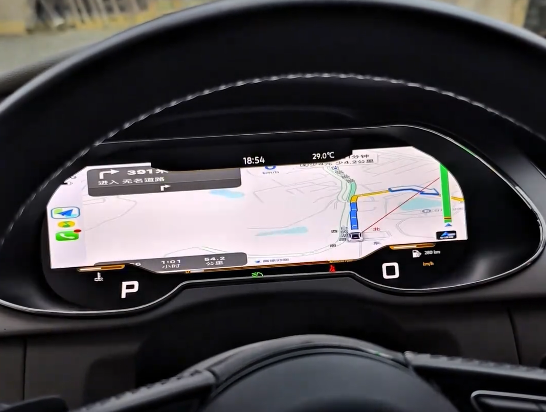
Navigacija, CarPlay i Android Auto očekivanja prikaza
Kupci često pitaju da li Audi A4 B8 digitalni kokpit vodič ruta može prikazivati navigaciju, CarPlay, Android Auto, ili drugi sadržaj povezan s telefonom unutar instrument table. Tačan odgovor zavisi od glavne jedinice, puta signala, verzije softvera i podržanog načina prikaza.
Na nekim postavkama, 12.3-inch LCD instrument tabla može prikazivati pojednostavljene navigacijske informacije, zrcaljenje sadržaja ili podržani ulaz signala. Na drugima, glavna mapa ostaje na centralnom ekranu dok instrument tabla prikazuje samo osnovne podatke o vožnji. Potpuno fabričko ponašanje pokretne mape ne treba pretpostavljati za svaki A4 B8 globalno.
Ako vam je prikaz navigacije na instrument tabli važan, tretirajte to kao pitanje kompatibilnosti prije narudžbe. Potvrdite šta vaše konkretno vozilo, glavna jedinica i verzija digitalne instrument table mogu podržati.
Tipke na volanu i ograničenja upravljanja brisačima
Digitalna instrument tabla ne može stvoriti hardverske funkcije koje vozilo već ne podržava. Prije nego što očekujete potpuno ponašanje tipki i ručice, provjerite koristi li vaš Audi A4 B8 i dalje originalni višenamjenski volan, fabrički modul za upravljanje na volanu i standardno ožičenje ručice brisača.
Ako je volan zamijenjen, ako tipke već ne rade, ili ako je ugrađen neoriginalni kontrolni modul, neke funkcije menija digitalne instrument table možda se neće ponašati kao fabrički Audi sistem. Isto važi i za informacije o brisačima. Instrument tabla može prikazivati podržane statusne podatke, ali ne zamjenjuje fizičku ručicu brisača niti dodaje nove modove brisača.
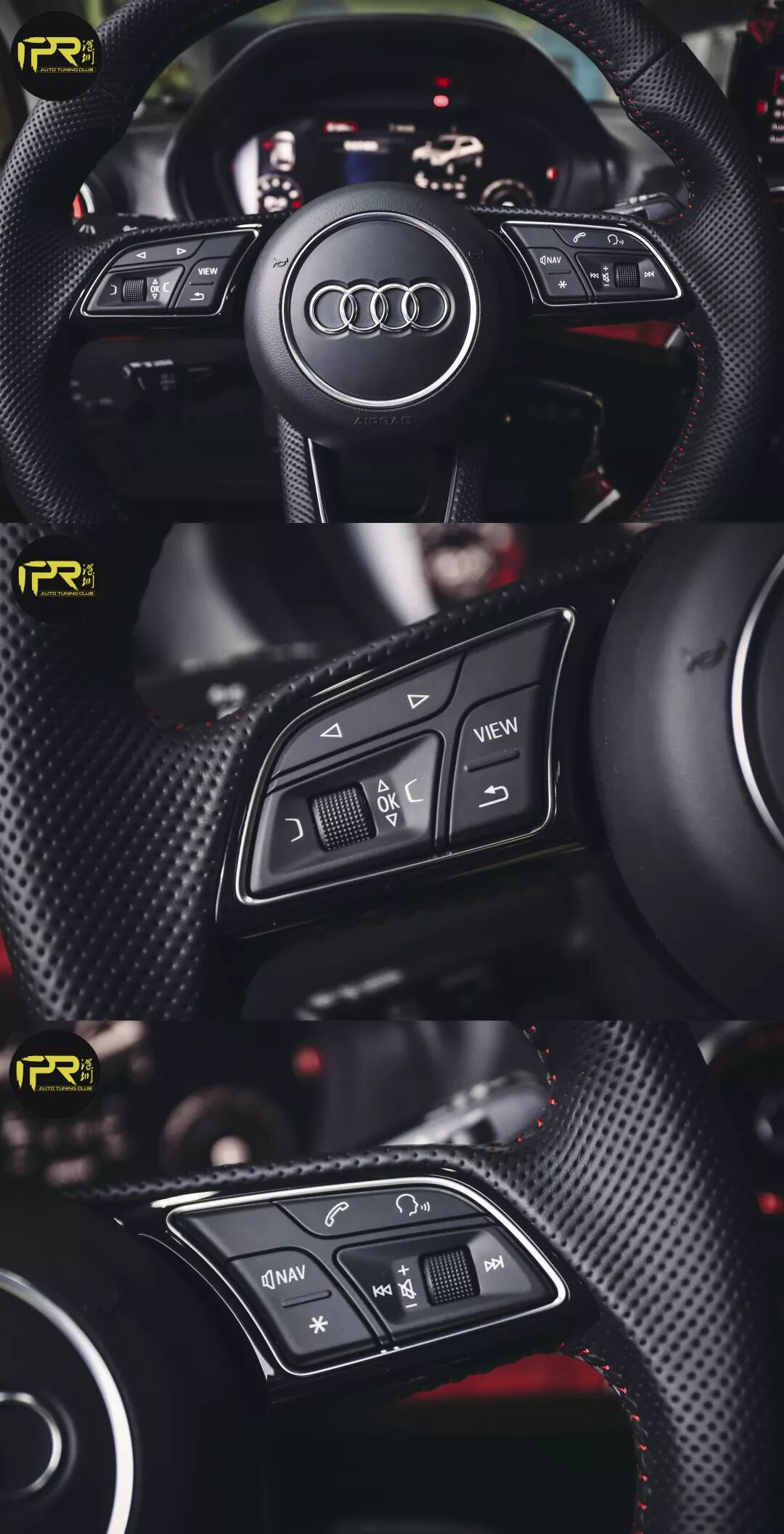
Confirm the original steering-wheel control hardware
Check whether the vehicle still uses the original multi-function steering wheel and factory control module. Non-original steering wheels may change button behavior after the digital cluster retrofit.
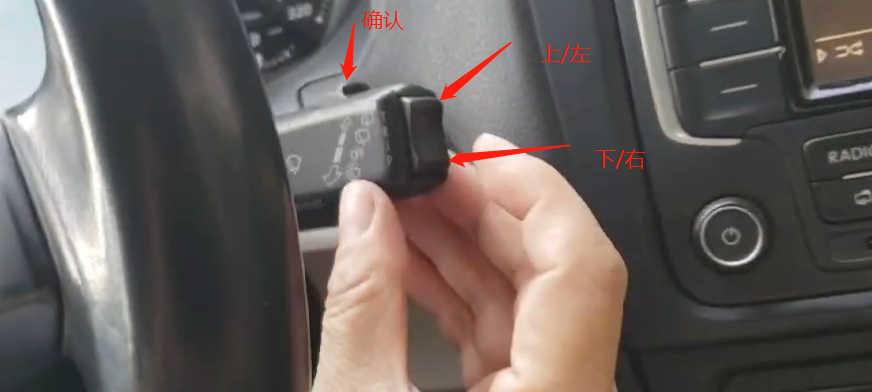
Check steering-wheel button protocol
If some buttons already do not work on the factory cluster, do not expect the digital cluster to repair the protocol. Some keys may still do nothing, or only support basic actions such as volume and track change.
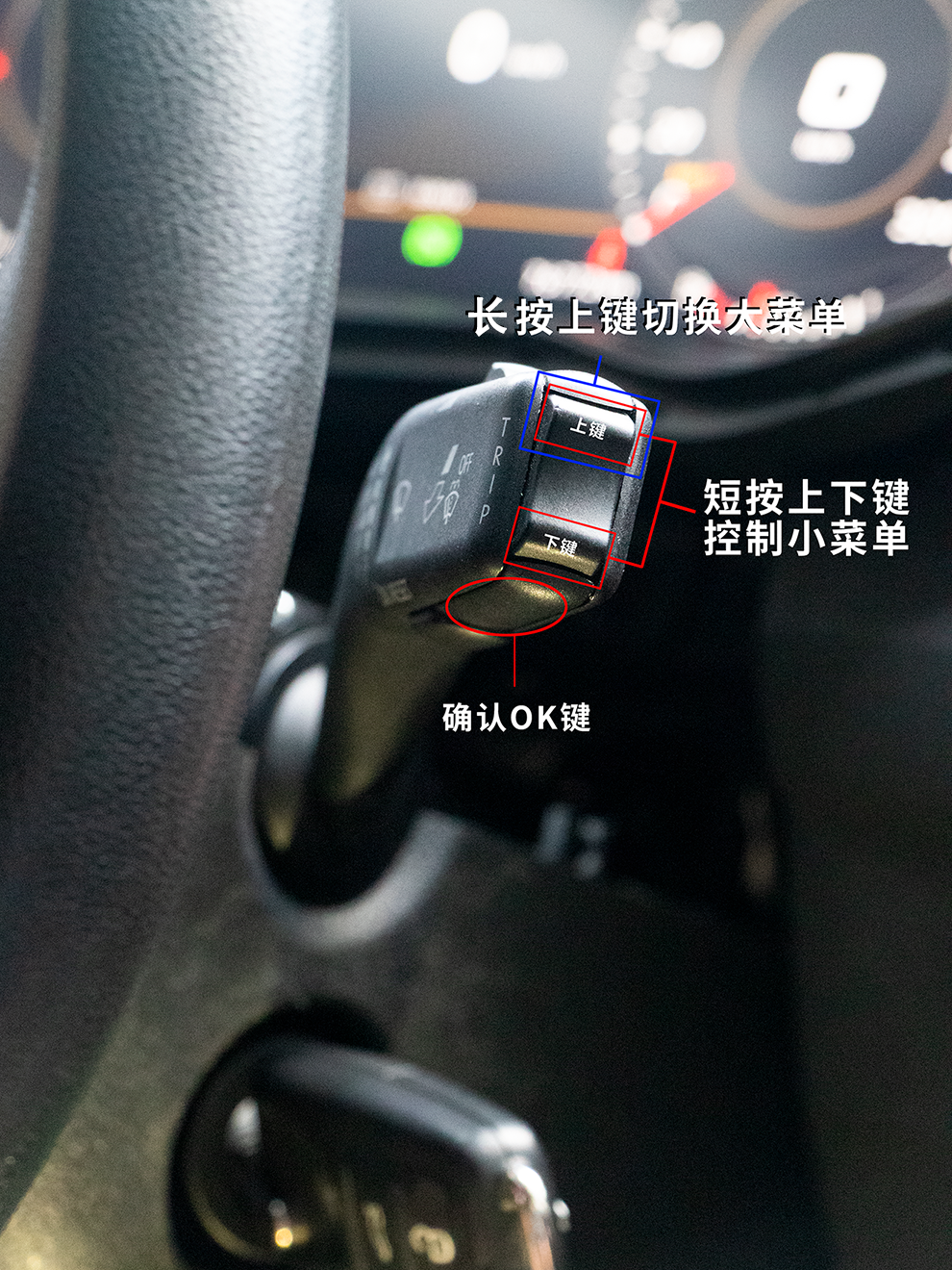
Check wiper stalk and related wiring
The digital cluster can only display the wiper status sent through the supported data route. If the stalk or wiring was modified, the wipers may work mechanically while cluster status information remains limited.
Treat full steering-wheel and wiper integration as conditional. It depends on original hardware, factory control modules, vehicle coding, wiring condition and previous retrofit history.
Pregled instalacije: Od analognih mjerača do 12.3-Inch LCD klastera
Fizički proces nadogradnje klastera Audi A4 B8 je jednostavan u konceptu, ali osjetljiv u detaljima. Instrument klaster je povezan s važnim informacijama vozila, logikom upozorenja i funkcijama prikaza za vozača. Posao bi trebala obaviti osoba upoznata s elektronikom vozila.
Tipična logika instalacije
- dokumentujte originalni klaster, signalne lampice i postojeće kvarove prije uklanjanja.
- isključite napajanje baterije prema sigurnoj servisnoj praksi.
- pažljivo uklonite oblogu stuba upravljača i okolnu oblogu instrument table.
- uklonite fabrički analogni klaster bez povlačenja kabelskog snopa.
- povežite digitalni klaster kroz odgovarajući kablovski put.
- izvršite konfiguraciju, softversko uparivanje ili prilagodbu ako je potrebno.
- testirajte sve funkcije prikaza za vozača prije konačnog ponovnog sastavljanja obloga.
Nemojte uklanjati ili bacati originalne ploče, zujalice, konektore ili interne dijelove bez potvrde njihove funkcije. Neke originalne komponente klastera mogu i dalje biti potrebne za ispravne podatke o vozilu i ponašanje upozorenja.
Referenca brzine pokretanja
Originalni članak uključuje demonstraciju pokretanja. Brzo podizanje sistema je korisno, ali sama brzina nije dovoljna. Klaster također mora prikazivati ispravne podatke o vozilu nakon pokretanja.
Kontrolna lista nakon instalacije
Uključivanje displeja nije dovoljno. Nakon instalacije, sljedeće stavke treba provjeriti prije nego što se vozilo vrati u svakodnevnu vožnju.
| Testni element | Šta provjeriti |
|---|---|
| Brzina i RPM | Vrijednosti trebaju biti stabilne, čitljive i usklađene s ponašanjem vozila. |
| Gorivo i temperatura | Očitavanja trebaju imati smisla prije normalne vožnje. |
| Pokazivači smjera i dugo svjetlo | Ikone lijevog/desnog pokazivača smjera i indikator dugog svjetla moraju biti ispravno prikazani. |
| Upozoravajuća svjetla | ABS, zračni jastuk, motor, pojas sigurnosti i druga potrebna upozorenja trebaju biti provjerena. |
| Tipke na volanu | Prebacivanje menija, jačina zvuka, odabir stranice ili podržane funkcije trebaju biti provjerene. |
| Informacije o brisačima | Podržani status brisača ili informacije povezane s polugom trebaju biti provjerene gdje je primjenjivo. |
| Ponašanje svjetline | Dnevna/noćna svjetlina i čitljivost trebaju biti testirane. |
| Navigacija ili zrcaljenje | Ako postavka podržava, potvrdite navigacijske upute ili ponašanje zrcalnog prikaza. |
Tehničke specifikacije
The Audi A4 B8 LCD instrument tabla je dizajniran kao sistem za prikaz u vozilu, a ne kao opći tablet. Cilj su brzo pokretanje, stabilan rad, čitljiva grafika i podrška za potrebne funkcije prikaza u vozilu.
- Operativni sistem: Automobilski firmware zasnovan na Linuxu.
- Procesor: Quad-core SoC sa namjenskom grafičkom obradom za rasporede klastera.
- Memorija i pohrana: 8 GB ugrađene flash memorije za teme, rasporede i ažuriranja.
- Vrijeme pokretanja: oko 3 sekunde od ACC ON do upotrebljivog prikaza instrumenata, ovisno o postavci.
- Veličina displeja: 12.3-inch LCD panel za Audi A4 B8.
- Rezolucija: 1920 × 720 px širokformatni prikaz.
- Radni temperaturni raspon: dizajnirano za stvarno korištenje u automobilu u uslovima vruće i hladne kabine.
- Bluetooth: Bluetooth 4.2 za podržanu povezanost.
- Wi-Fi: 802.11 b/g/n za podržane rute povezivanja i ažuriranja softvera.
- Podrška jeziku: Više UI jezika za menije i upite.
Specifikacije treba provjeriti na trenutnoj stranici proizvoda prije kupovine. Funkcije softvera, rasporedi i podržani načini prikaza mogu se razlikovati ovisno o verziji proizvoda.
Podržane fabričke informacije i realistična ograničenja
The system is designed to retain Informacije o podržanoj fabrici gdje su originalna ruta podataka vozila, konfiguracija klastera i ugrađeni kontrolni moduli kompatibilni.
To može uključivati podržana upozoravajuća svjetla, prikaz pređene udaljenosti, pokazivače smjera, status vrata, osnovne informacije o putovanju i odabrane podatke o vozilu. Međutim, digitalni instrument tabla ne može izumiti nedostajuće senzore, popraviti oštećeno ožičenje ili normalizirati svaku prethodnu naknadnu modifikaciju.
Dobar kandidat
- 2009–2012 Audi A4 B8 s originalnom analognom instrument pločom.
- Originalni volan i kontrolni modul su i dalje prisutni.
- Nema poznate ozbiljne štete na ožičenju instrument table.
- Jasne fotografije vozila i informacije o konektorima dostupne su prije narudžbe.
Potrebna dodatna provjera
- Neoriginalan volan ili nepoznati upravljački modul.
- prethodni radovi na preinaci iza instrument table.
- Oblast ožičenja ili instrument table popravljena nakon nesreće.
- vozilo s volanom na desnoj strani ili neobična tržišna verzija.
- Vlasnik očekuje potpuno tvorničko ponašanje mape u Audi Virtual Cockpitu bez potvrde.
Ko bi trebao razmotriti ovo nadogradnju?
Ovo Nadogradnja instrument table za Audi A4 B8 Najbolje je za vlasnike koji planiraju zadržati automobil i žele da kokpit bude bliži trenutnim Audi modelima. To je posebno relevantno ako vozilo već ima modernu Android glavnu jedinicu ili multimedijalnu nadogradnju u OEM stilu, ali instrument tabla i dalje izgleda zastarjelo.
Ovo nadogradnja ima smisla ako vi
- Redovno vozite A4 B8 i brinete o preglednosti kokpita.
- Želim moderan digitalni instrument tabla bez mijenjanja cijelog automobila.
- Radije odabirem nadogradnju specifičnu za vozilo nego univerzalni ekran.
- Možemo dostaviti fotografije originalnog instrument table prije narudžbe.
- Razumjeti da je testiranje nakon instalacije dio posla.
Ovo ažuriranje možda nije pravo za vas ako
- Želim da vozilo ostane potpuno originalno iz razloga kolekcionarstva.
- Očekujte službenu fabričku nadogradnju Audi Virtual Cockpita.
- potrebno je zagarantovano fabričko ponašanje karte na cijelom ekranu bez provjeravanja postavki vaše glavne jedinice i instrument table.
- imaju nepoznato oštećenje ožičenja ili velike prethodne modifikacije instrument table.
Često postavljana pitanja
Namijenjen je za glavne Audi A4 B8 2009–2012 modele s originalnim analognim instrumentima. Konačnu kompatibilnost treba potvrditi pomoću originalnih fotografija instrument table, modela godišta, strane volana, puta konektora i tržišne verzije prije narudžbe.
Ne. To je aftermarket Audi A4 B8 digital cluster retrofit dizajniran da kokpitu pruži moderan digitalni prikaz. Ne bi trebalo da se opisuje kao zvanična Audi fabrička Virtual Cockpit konverzija.
Neka vozila mogu zahtijevati konfiguraciju, adaptaciju ili usklađivanje softvera, ovisno o tržišnoj verziji, prethodnim modifikacijama i instaliranim kontrolnim modulima. Ne pretpostavljajte da je svako vozilo isto.
Sistem je dizajniran da zadrži podržane informacije o upozorenjima kada su izvorna ruta podataka vozila i konfiguracija instrument table kompatibilni. Svjetla upozorenja moraju se testirati nakon instalacije prije normalne vožnje.
Neke konfiguracije mogu prikazati podržanu navigaciju, zrcaljenje ili unos signala, ovisno o glavnoj jedinici, telefonskom sistemu, kablu, verziji softvera i konfiguraciji instrument table. Potpune tvorničke pokretne mape nisu zajamčene na svakom A4 B8.
Možda i dalje radi kao ekran, ali se ne garantuje potpuna integracija tipki na upravljaču ako je originalni upravljač, kontrolni modul ili protokol tipki izmijenjen.
Pošaljite jasnu fotografiju prednjeg dijela originalnog uključenog instrument panela, širu fotografiju komandne table, modelsku godinu, stranu volana i bilo koju dostupnu fotografiju zadnjeg konektora. Također navedite prethodno ožičenje, kodiranje ili modifikacije volana.
Provjerite brzinu, broj obrtaja, nivo goriva, upozoravajuća svjetla, pokazivače smjera, dugine svjetlo, tipke na upravljaču, status brisača gdje je podržan, ponašanje svjetline i sve navigacijske ili funkcije ogledanja uključene u vašu konfiguraciju.
Gdje kupiti digitalnu instrument tablu za Audi A4 B8
This article is designed to help owners understand the upgrade before buying. For product price, availability, included parts, current configuration details and order options, use the product page below.
Pogledajte stranicu proizvoda Audi A4 B8 digitalni instrument klaster
Confirm your vehicle year, original cluster photo, steering side, dashboard photo and wiring condition before ordering. This reduces wrong-version risk and makes installation preparation more realistic.





Add comment